

How to play music bingo
Music bingo is played in a way similar to traditional bingo, but with music instead of numbers. Here's a basic guide:
Preparation
- Make your bingo cards here, where each square contains the title of a song or the name of an artist instead of a number.
- Print the bingo cards out and bring out your best speaker.
How it's played
- Each player gets one or more bingo cards.
- Play the music. Play a snippet of each song from your playlist.
- When a player recognises a song that's playing and it's on their card, they mark that square.
- The goal is to get a full row horizontally, vertically or diagonally — whatever you agree on.
Winning
- When a player marks a full row and shouts "Bingo!" (or a fun variant like "Music Bingo!"), check their card. If it is correct, they are the winner.
- You can vary the game by aiming for different patterns, e.g. a full card, four corners or a specific shape.
Extra fun
- To add extra fun, include themed playlists (e.g. 80s hits, rock classics, pop hits, etc.).
- You can also encourage people to sing along or dance while the music plays.
Music bingo can be adapted to any group or event, making it a versatile and entertaining activity for all ages. Remember to choose songs your participants are likely to recognise.
Music Bingo Calculator
Calculate how long your game will take and how many unique cards you can make.
Game time
25 min
Songs per card
16
Unique cards
4.923.689.695.575
Two cards with the same songs in different orders count as the same card.
Recommendations for song choice and duration
We recommend having between 50–60 songs on your playlist. This gives good variety and ensures everyone has a fun and entertaining experience.
Tip: It's a good idea not to play every song to the end. By only playing part of each song, you avoid taking too long to get through the list, and you can keep a good pace at the event.
Music bingo typically takes between 45 minutes and 1 hour.
Your Spotify playlist can't be locked
If the playlist is private, we can't read the songs. Learn how to make it public — plus our best tips for picking songs.
Tips for the Host
Before the party it's essential to build a varied music playlist that reflects your guests' tastes.
Be sure to vary genres and time periods so every participant can recognise at least some tunes.
Consider planning breaks where guests can relax and socialise. These moments can also be used for refreshments or light anecdotes related to the music, which boost the shared experience and the atmosphere.
A detailed walkthrough of the game flow is crucial; make sure to go through the rules clearly and visibly before starting, so everyone is on board from the beginning.
Variations for all ages
Music bingo offers a wide range of genres and themes that can be adapted to age groups and different music preferences. With favourite hits for both older and younger guests, all generations can join in on the fun.
From classic evergreens to modern pop hits, the choice of music creates a vital bridge between participants across ages. A music bingo can also be designed with hits from specific decades, where participants' musical memories and stories become part of the celebration.
Consider including categories like film hits or musical songs, which often bring broad appeal and support cultural variety in the music selection.
For children's parties or family events you can arrange a kid-friendly version of music bingo with songs from popular children's films and shows, inviting singing and dancing among the smallest guests.
Thanks to its flexibility, music bingo can create entertainment that resonates with participants' different backgrounds and life stages, contributing to a truly inclusive and memorable celebration.
Frequently asked questions
How does music bingo work?
Music bingo works like regular bingo, but instead of numbers each square shows a song title or artist. The host plays short clips from a playlist, and players mark the songs they recognise on their card. The first player to complete a row — or a full card — shouts bingo and wins.
How many songs do you need for music bingo?
We recommend 50–60 songs for a standard game. That gives enough variety for unique cards and keeps the game exciting without dragging on. For shorter games, 30–40 songs work well.
How long does a game of music bingo take?
A typical game lasts 45 minutes to an hour if you play 15–30 seconds of each song. You can adjust the length with the number of songs and rounds — use the calculator on this page to estimate your game time.
Can you play music bingo at home?
Absolutely. All you need is a speaker, a playlist and bingo cards. Make your cards with Musingo, print them or share the digital version, and press play — perfect for birthdays, parties and family nights at home.
What do you need to host music bingo?
Three things: a playlist (Spotify or Apple Music), bingo cards generated from that playlist, and a good speaker. Optional extras: small prizes for the winners and a big screen for the digital QR code version.
Is music bingo the same as Singo?
Singo is a branded version of the same idea: bingo played with songs instead of numbers. The rules on this page apply to music bingo in general, so you can use them for any variant — including games people call Singo.
Ready to get started?
Pick your playlist and get your bingo cards in just a few minutes
Make your cards nowCopy a Spotify playlist
How to find and copy the link from your phone

Find the playlist
Tap the small icon that looks like a person+ (red square)

Copy the link
Tap the "Copy link" button

Paste the playlist
Go to musingo.net, paste the link into the Spotify playlist ID field, and your bingo cards will be ready shortly.
Shuffle your playlist
Important: use the right shuffle button

Use the shuffle button
Make sure the small shuffle icon next to the play button is active when you start a new round of music bingo.

Avoid shuffle+
Be careful that the shuffle icon with the small plus is NOT selected — otherwise Spotify will automatically add songs to the playlist.
Make your playlist public
Musingo requires the playlist to be public

Open settings
Tap the 3 small dots at the top of the playlist.

Check visibility
If it says "Private playlist" under the playlist name, tap "Make public".
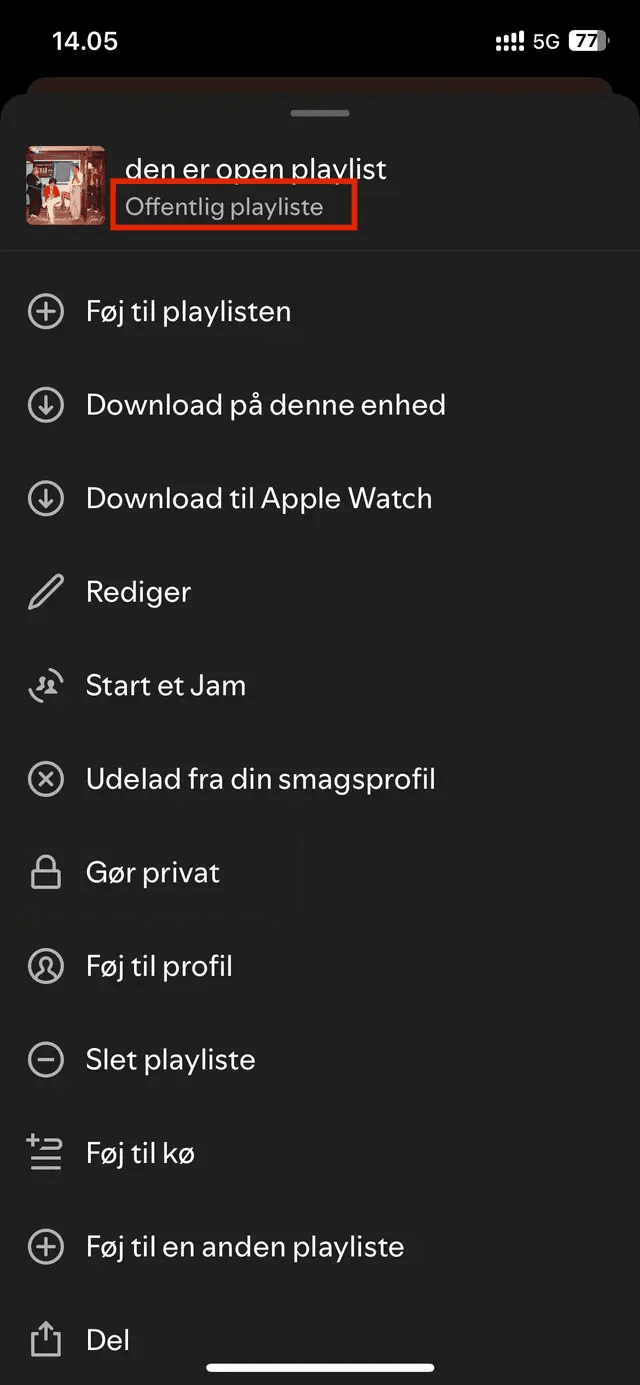
Playlist ready
Your playlist is now public and you can use it to create your music bingo cards.